This is part 4 of the series on medallion architecture in Microsoft Fabric. In part 3 we read the CSV in silver, still raw. Now we'll clean the data and write it as a Delta table.
In one sentence: we clean the data with PySpark and store it as a Delta table, a reliable format.

Cleaning the data
In a second cell of the nb_transformacao_silver notebook, I fix the CSV's problems and save the result as a Delta table:
# Cell 2: Clean the data and write the Delta table
from pyspark.sql.functions import col

df_limpo = (
    # Remove repeated transactions, using id_transacao as the key
    df_raw.dropDuplicates(["id_transacao"])
    # Drop records with no value. This is a business decision: in other scenarios
    # you might fill in the value, flag the record or send it to a rejects table
    .filter(col("valor").isNotNull())
    # Ensure a numeric type. For monetary values, in real projects
    # prefer decimal over double, to avoid rounding errors
    .withColumn("valor", col("valor").cast("double"))
)

# Write as a managed Delta table
(
    df_limpo.write.format("delta")
    # overwrite: replaces the table on every run (Delta records a new version in the log)
    .mode("overwrite")
    # saveAsTable: writes and registers the table by name in the lakehouse (shows up under Tables)
    .saveAsTable("fato_vendas")
)

print("Delta table 'fato_vendas' created successfully in lh_silver!")
What each step does
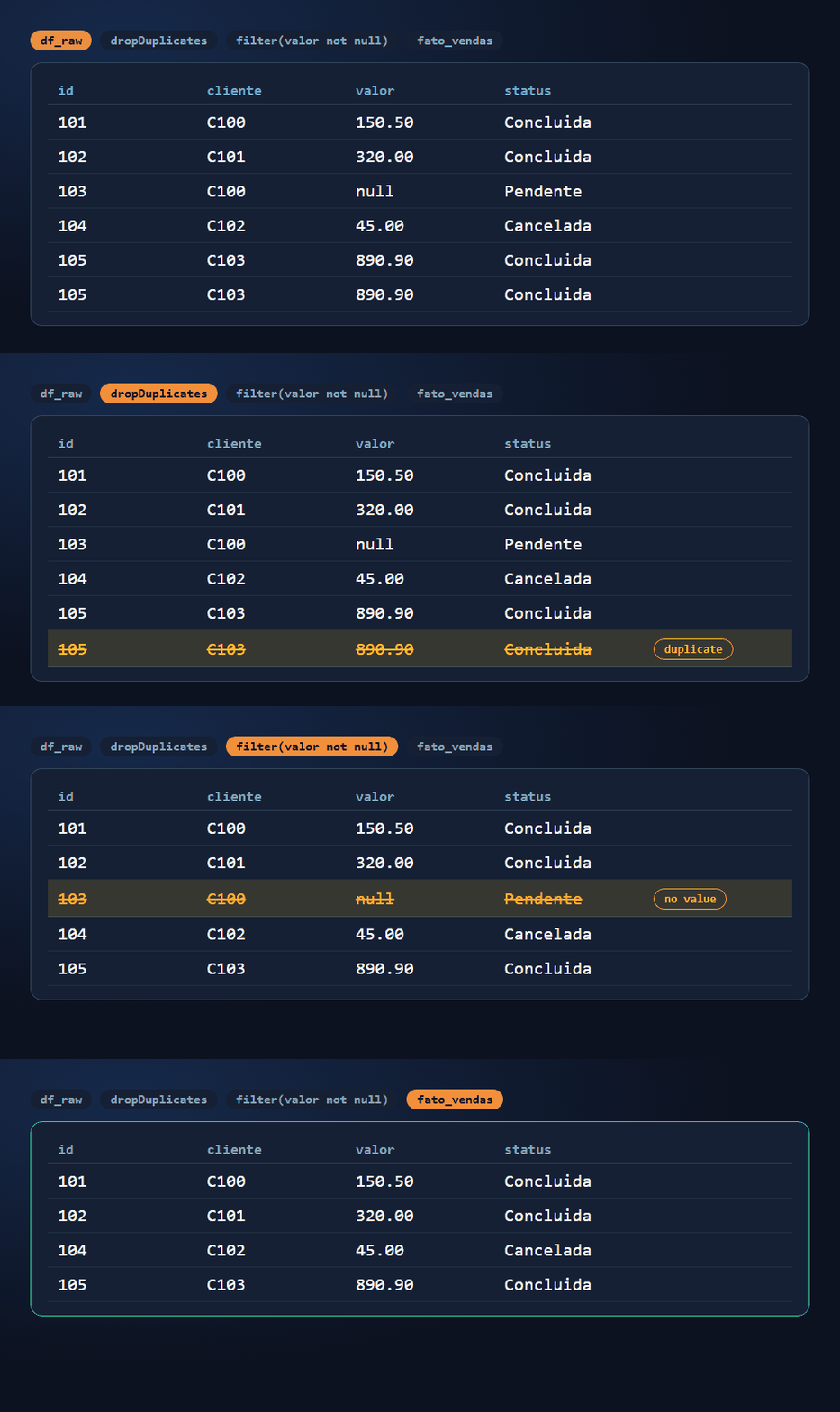
dropDuplicates(["id_transacao"]): removes repeated records, using the transaction ID as the key. That's the case of transaction 105.filter(col("valor").isNotNull()): keeps only records with a filled-in value. Transaction 103, with no value, is left out.cast("double"): converts thevalorcolumn to the numeric typedouble, making sure it's treated as a number.
Before and after: out of six records, four remain (101, 102, 104 and 105). The comments in the code remind you that dropping records with no value is a business decision and that, for money, decimal is usually better than double.
Writing the Delta table
format("delta"): writes in Delta format.mode("overwrite"): replaces the table's contents on every run. That lets you run the notebook several times without duplicating data. Delta records the overwrite as a new version in the log.saveAsTable("fato_vendas"): writes the data and registers the table by name in the lakehouse. That way it shows up under Tables and can be queried by name, including with SQL. If I used justsave()with a path, the files would be written, but the table wouldn't be registered by name in the catalog.
The animation shows what happens underneath when the write runs: the first time it creates a Parquet file and a Delta log entry; running it again with overwrite creates a new version.

Since lh_silver is the notebook's default lakehouse, the table is created under Tables as a managed table: Fabric takes care of both the files and the metadata.
Result
In silver, under Tables, the fato_vendas table appears. The icon with a triangle shows it's in Delta format.

This closes the loop on the shortcut from part 3: I could have turned the CSV into Delta right when creating the shortcut, but I chose to keep it as CSV, clean the data in the notebook and only then write it as Delta.
Under the hood: what a Delta table is
Everything under Tables is a Delta table. Underneath, it's made of two parts:
- Parquet files: store the data in a columnar, compressed format, which lets you store and query large volumes efficiently.
- Delta log (the
_delta_logfolder): the record of every write transaction made to the table.

Parquet and Delta are not the same thing. The data is saved as Parquet, but what makes it a Delta table is the transaction log that goes along with the files. That's why we say "Delta tables" or "data in Delta format", not just Parquet.
ACID transactions
It's the Delta log that enables ACID transactions on the lakehouse tables:
- Atomicity: the operation happens in full or not at all. If something fails midway, nothing is written halfway.
- Consistency: data moves from one valid state to another valid state, respecting the defined rules.
- Isolation: concurrent transactions don't interfere with each other.
- Durability: once committed, the write is permanent, even through a power or internet outage.

Frequently asked questions
What is the difference between save and saveAsTable?
saveAsTable writes the data and registers the table by name in the lakehouse, so it shows up under Tables and can be queried by name, including with SQL. save with a path writes the files, but doesn't register the table by name in the catalog.
What happens if I run the notebook again?
With mode("overwrite"), the table is replaced by the new result and the data isn't duplicated. Delta records the overwrite as a new version in the log.
Are Parquet and Delta the same thing?
No. Parquet is the file format that stores the data, in a columnar, compressed way. Delta is Parquet plus the Delta log, the transaction record that backs ACID.
Can I go back to the previous version of the table?
Generally yes. Since every write becomes a version in the Delta log, you can query earlier versions (time travel) as long as the old files haven't been removed by a cleanup (VACUUM). That topic deserves its own chapter.
Going further (Microsoft documentation)
Summary
- We cleaned the data with PySpark: removed the duplicate, dropped the record with no value and ensured the numeric type.
- We wrote the result as the Delta table
fato_vendas, under Tables, withsaveAsTable. - A Delta table is made of Parquet files plus the Delta log, and it's the log that guarantees ACID transactions.
In part 5, we'll query fato_vendas with the SQL analytics endpoint.