This is part 5 of the series on medallion architecture in Microsoft Fabric. In part 4 we wrote the Delta table fato_vendas. Now we'll query it with the SQL analytics endpoint, with no notebook needed.
In one sentence: with the SQL analytics endpoint you can query the table with SQL, without opening a notebook.

What is the SQL analytics endpoint
The SQL analytics endpoint is the T-SQL query door into a lakehouse's Delta tables: it reads the data but doesn't change it. Every Fabric lakehouse gets one automatically.
To open it, while in lh_silver, use the Analyze data with menu and choose SQL analytics endpoint.

What it does and doesn't do
The endpoint is built for querying:
- You can: query tables with
SELECT, and create views and functions. It also serves as the basis for the semantic models used in Power BI reports. - You can't: change the data in the tables. There's no
INSERT,UPDATEorDELETEhere. To modify data, the way is the notebook (as we did when writingfato_vendas) or other transformation tools.

Tip: the endpoint mirrors the lakehouse tables and is updated automatically. If you've just written a table, there may be a short delay before it shows up there.
A first analysis
With the endpoint open, create a new query and run:
-- Quick look at revenue and volume per customer
SELECT
    id_cliente,
    COUNT(id_transacao) AS qtd_compras,
    SUM(valor)          AS faturamento_total,
    AVG(valor)          AS ticket_medio
FROM dbo.fato_vendas
-- Heads up: every status is included here, even Canceled transactions.
-- For real revenue, consider filtering by status = 'Concluida'
GROUP BY id_cliente
ORDER BY faturamento_total DESC;
The query groups sales by customer and calculates:
COUNT: the number of purchases per customer.SUM: total revenue.AVG: the average ticket, that is, the average value per purchase.
ORDER BY ... DESC puts the customers with the highest revenue at the top.
See the query running and the result appearing:
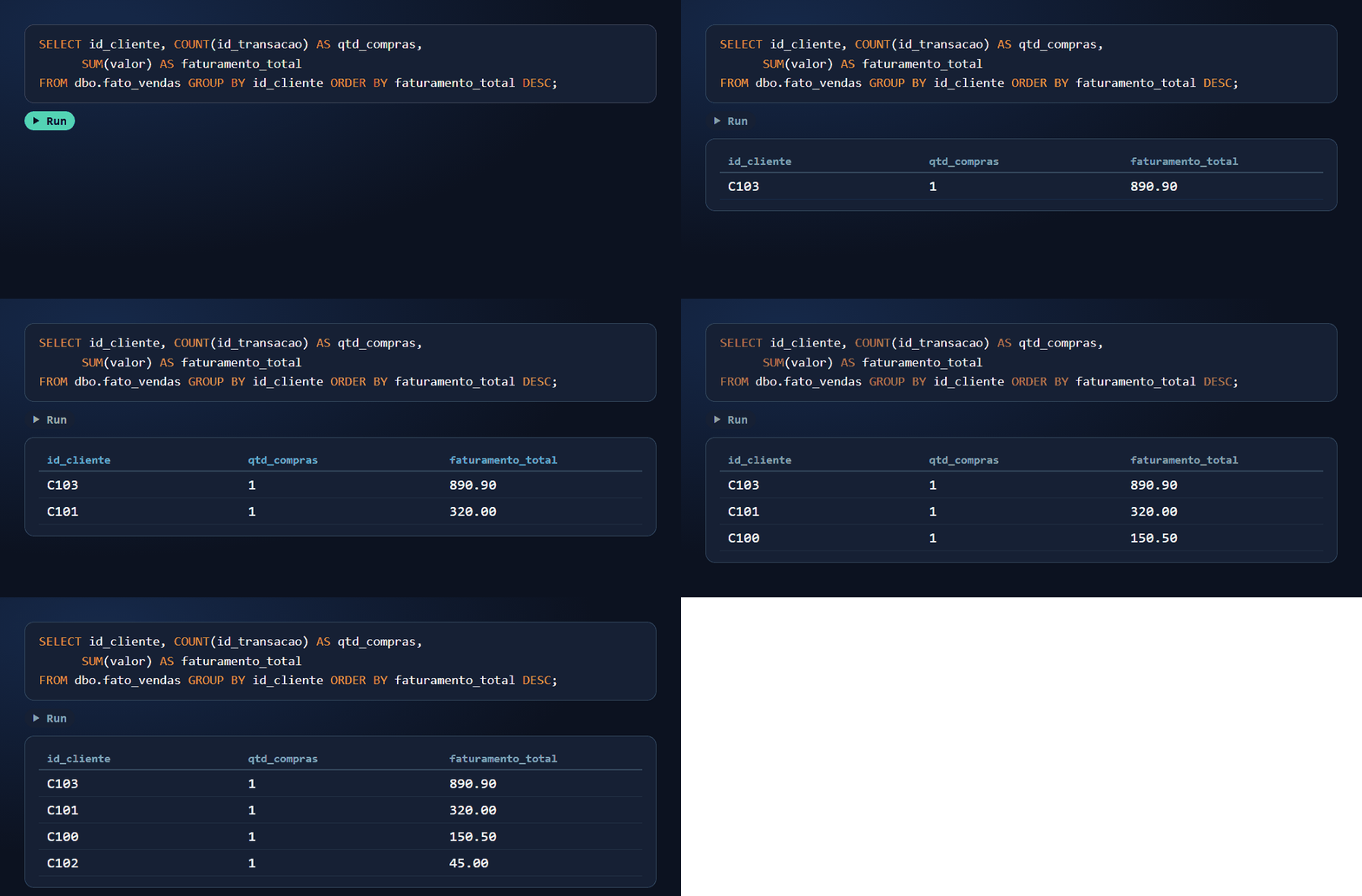
With our example data, the expected result is:
| id_cliente | qtd_compras | faturamento_total | ticket_medio |
|---|---|---|---|
| C103 | 1 | 890.90 | 890.90 |
| C101 | 1 | 320.00 | 320.00 |
| C100 | 1 | 150.50 | 150.50 |
| C102 | 1 | 45.00 | 45.00 |
Notice two details that come from the cleanup in part 4: customer C100 has only one purchase because transaction 103, with no value, was dropped in silver; and C102 counts toward revenue even though their only transaction was canceled. That shows why the status filter matters in a real analysis.
Going further (Microsoft documentation)
Summary
- The SQL analytics endpoint is created automatically with each lakehouse and lets you query the tables with T-SQL.
- It's for querying: you can create views and functions, but not change the table data.
- We ran a first revenue-per-customer analysis on
fato_vendas.
That wraps up the bronze and silver layers. The gold layer comes next, as I move forward in my studies.